
The Joy of an Optimized, Complete Javascript Table Sort
Wow! This takes me back! Please check the date this post was authored, as it may no longer be relevant in a modern context.
When you’re done poking through this, check out the final version of this script at The Joy of Cows On Tables
A few days ago we walked through writing our own mootools-based table sort in the Joy of a Minimal, Complete Javascript Table Sort. A poster going by “hello there” raised a good point about performance:
“would be nice to see the example with several hundred rows - performance in sorting is a huge issue, and looking at the zillions of libraries out there… many of them konk out completely, taking 5 seconds to sort a table with 1,000 rows.”
Right. Javascript should be used to enhance a user’s experience. 5 seconds of wait times for a table sort is completely asinine. Let’s look at some quick ways to optimize our code, and uncover a slick way to double the speed of our sorting.
The Easy Stuff
I’m going to use The Firebug Firefox plugin for my analysis. These changes should have pretty a universal effect though. Let’s look at some sorting times on 1000 rows:
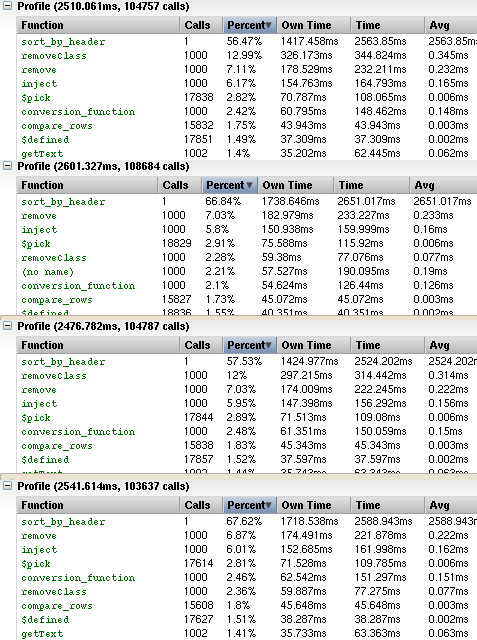
Ok, so about a second and a half on my 2.0 Ghz C2D and 2G RAM laptop. Not as bad as the 5 seconds we were worried about, but not really great. Some easy targets in optimization stand out:
- removeClass - I’d bet dollars to donuts this can be tweaked.
- .length() is checked every loop.
.removeClass() is a function in mootools. It looks like this:
  removeClass: function(className){
    this.className = this.className.replace(new RegExp('(^|\\s)' + className + '(?:\\s|$)'), '$1').clean();
    return this;
  },
We run removeClass at least 1000 times after a sort on our table. The className our code always passes to removeClass is “alt”. We can avoid the initialization of 1000 RegExp objects if we save one initialized RegExp somewhere. This is an easy change that’ll save us as much as 300ms of time:
var SortingTable = new Class({

  // And here it is
  removeAltClassRe: new RegExp('(^|\\s)alt(?:\\s|$)'),

  initialize: function( table, options ) {
    this.options = $merge({
Now that same RegExp needs to be used where we before called removeClass. For example, in stripe_table():
      counter++;
    }
    // tr.removeClass( 'alt' );
    // Now use our already existing RegExp
    tr.className = tr.className.replace( this.removeAltClassRe, '$1').clean();
    if ( !(( counter % 2 ) == 0) ) {
      tr.addClass( 'alt' );
    }
One down.
.length() was our other easy tweak. Instead of looping with:
   while (this.rows.length > 0) {
     var row = this.rows.shift();
We can consolidate those lines down to:
while ( row = this.rows.shift() ) {
Neat.
With those two small tweaks, things have been speed up slightly. Performance on the 1000 row table hovers around 2.1 seconds at best. We can do better, but things are going to get weird.
The Good Stuff
Russel over at lindsay.ie.au found something neat out. The native sort() method is far faster if you don’t pass it a function to sort with. Internally, sort() calls toString() on every array element it sorts, so if we overload toString, we can take advantage of that huge speed boost:
Remember this from the middle of the sort_by_header function?
    this.rows.each(function(row){
      row.compare_value = this.conversion_function( row );
    }.bind( this ));
    this.rows.sort( this.compare_rows.bind( this ) );
  }
If we overload toString for the elements on this.rows, we won’t need to pass a function into sort.
    this.rows.each(function(row){
      row.compare_value = this.conversion_function( row );
      row.toString = function(){ return this.compare_value }
    }.bind( this ));
    this.rows.sort();
  }
Now sort should be super fast.
And it is very fast, it takes about 1.2 seconds to sort 1000 rows in Firefox. The difference on Internet Explorer under VMware isn’t as large, but it is noticeable. The big fault is that we’re now tied to how sort() sorts. Alphabetically.
That means we can’t sort numbers properly. We’ll end up with
mixonic@pandora ~/Projects/table $ js
js> [ 0, 1, 2, 11 ].sort();
0,1,11,2
js> // So instead, lets pad numbers into strings
js> [ '000', '001', '002', '011' ].sort();
000,001,002,011
js>
As “minroi_aoi” mentioned in the last post, sorting with numbers was funky. The solution was to pass real integers out of the conversion function instead of strings. getText() always returns a string. parseInt() is the javascript function to convert them to integers:
     // Numbers
      { matcher: /^\d+$/,
        conversion_function: function( row ) {
          var cell = $(row.row.getElementsByTagName('td')[this.sort_column]).getText();
          return parseInt(cell);
        }
      },
As we saw above though, we need a padded string now, not an integer. Our number function will have to look like this:
      // Numbers
      { matcher: /^\d+$/,
        conversion_function: function( row ) {
          var cell = $(row.row.getElementsByTagName('td')[this.sort_column]).getText();
          return '0000000000'.substr(0,10-cell.length).concat(cell);
        }
      },
And if you want to sort integers longer than 10 digits, you’d need to expand the pad string and the offset. There is a tradeoff here: storing the strings for sort takes up more memory than just the number would. In this script, that memory is only taken up while sorting, after that the memory is freed.
All of that left us with this new script:
//
// new SortingTable( 'my_table', {
//   zebra: true,     // Stripe the table, also on initialize
//   details: false   // Has details every other row
// });
//
// The above were the defaults.  The regexes in load_conversions test a cell
// begin sorted for a match, then use that conversion for all elements on that
// column.
//
// Requires mootools Class, Array, Function, Element, Element.Selectors,
// Element.Event, and you should probably get Window.DomReady if you're smart.
//

var SortingTable = new Class({

  removeAltClassRe: new RegExp('(^|\\s)alt(?:\\s|$)'),

  initialize: function( table, options ) {
    this.options = $merge({
      zebra: true,
      details: false
    }, options);

    this.table = $(table);

    this.tbody = $(this.table.getElementsByTagName('tbody')[0]);
    if (this.options.zebra) {
      SortingTable.stripe_table( this.tbody.getElementsByTagName( 'tr' ) );
    }

    this.headers = new Hash;
    var thead = $(this.table.getElementsByTagName('thead')[0]);
    $each(thead.getElementsByTagName('tr')[0].getElementsByTagName('th'), function( header, index ) {
      var header = $(header);
      this.headers.set( header.getText(), { column: index } );
      header.addEvent( 'mousedown', function(evt){
        var evt = new Event(evt);
        this.sort_by_header( evt.target.getText() );
      }.bind( this ) );
    }.bind( this ) );

    this.load_conversions();
  },

  sort_by_header: function( header_text ){
    this.rows = new Array;
    var trs = $A(this.tbody.getElementsByTagName( 'tr' ));
    while ( row = trs.shift() ) {
      row = { row: row.remove() };
      if ( this.options.details ) {
        row.detail = trs.shift().remove();
      }
      this.rows.unshift( row );
    }

    var header = this.headers.get( header_text );
    if ( this.sort_column >= 0 && this.sort_column == header.column ) {
      // They were pulled off in reverse
    } else {
      this.sort_column = header.column;
      if (header.conversion_function) {
        this.conversion_function = header.conversion_function;
      } else {
        this.conversion_function = false;
        this.rows.some(function(row){
          var to_match = $(row.row.getElementsByTagName('td')[this.sort_column]).getText();
          if (to_match == ''){ return false }
          this.conversions.some(function(conversion){
            if (conversion.matcher.test( to_match )){
              this.conversion_function = conversion.conversion_function;
              return true;
            }
            return false;
          }.bind( this ));
          if (this.conversion_function){ return true; }
          return false;
        }.bind( this ));
        header.conversion_function = this.conversion_function.bind( this );
        this.headers.set( header_text, header );
      }
      this.rows.each(function(row){
        row.compare_value = this.conversion_function( row );
        row.toString = function(){ return this.compare_value }
      }.bind( this ));
      this.rows.sort();
    }

    var index = 0;
    while ( row = this.rows.shift() ) {
      row.row.injectInside( this.tbody );
      if (row.detail){ row.detail.injectInside( this.tbody ) };
      if ( this.options.zebra ) {
        row.row.className = row.row.className.replace( this.removeAltClassRe, '$1').clean();
        if (row.detail){
          row.detail.className = row.detail.className.replace( this.removeAltClassRe, '$1').clean();
        }
        if ( ( index % 2 ) == 0 ) {
          row.row.addClass( 'alt' );
          if (row.detail){ row.detail.addClass( 'alt' ); }
        }
      }
      index++;
    }
    this.rows = false;
  },

  load_conversions: function() {
    this.conversions = $A([
      // YYYY-MM-DD, YYYY-m-d
      { matcher: /\d{4}-\d{1,2}-\d{1,2}/,
        conversion_function: function( row ) {
          var cell = $(row.row.getElementsByTagName('td')[this.sort_column]).getText();
          var re = /(\d{4})-(\d{1,2})-(\d{1,2})/;
          cell = re.exec( cell );
          return new Date(parseInt(cell[1]), parseInt(cell[2], 10) - 1, parseInt(cell[3], 10));
        }
      },
      // Numbers
      { matcher: /^\d+$/,
        conversion_function: function( row ) {
          var cell = $(row.row.getElementsByTagName('td')[this.sort_column]).getText();
          return '00000000000000000000000000000000'.substr(0,32-cell.length).concat(cell);
        }
      },
      // Fallback
      { matcher: /.*/,
        conversion_function: function( row ) {
          return $(row.row.getElementsByTagName('td')[this.sort_column]).getText();
        }
      }
    ]);
  }

});

SortingTable.stripe_table = function ( tr_elements  ) {
  var counter = 0;
  $$( tr_elements ).each( function( tr ) {
    if ( tr.style.display != 'none' && !tr.hasClass('collapsed') ) {
      counter++;
    }
    tr.className = tr.className.replace( this.removeAltClassRe, '$1').clean();
    if ( !(( counter % 2 ) == 0) ) {
      tr.addClass( 'alt' );
    }
  }.bind( this ));
}
Now a bit over twice as fast as before.
Again, you can pull this script down as javascript or see an example.
Don’t forget to find the final version of this script in The Joy of Cows On Tables